Data and ID verification for registrars
As a registrar, you may find that registrants contact you with questions about the process, deadlines, or verification status. Your role depends on the model you have chosen. Regardless of the model, you can help the registrant understand the process, find the relevant email from Punktum dk, and see whether their ID and/or email address has been verified.
The three validation models
By default, Punktum dk handles all data and ID verifications for all registrars. You can change the settings the registrar portal.
1. Punktum dk handles everything
Punktum dk handles communication and verification n in connection with new registrations, updates, etc. The registrar has no tasks in the actual verification process but can still view the status and help the registrant understand the process.
2. The registrar verifies when creating new contact
When creating a new contact, the registrar can indicate that the registrant’s email address and ID have been validated. This is a combined validation: you must indicate that both the email address and ID have been validated. It is not possible to indicate only one of the two.
Subsequent verification, for example when updating contact information, is handled by Punktum dk.
3. The registrar handles everything
The registrar has full responsibility for verifying registrants in connection with new registrations, updates, etc. This model is not the default setting and must be actively selected in the registrar portal.
If you are unsure which model you have chosen, or if you wish to change it, you can do so in the registrar portal or contact Punktum dk.
How ID-verification works
Registrants with a Danish country code
All new registrants with a Danish country code are automatically asked to complete ID verification via MitID. This is not assessed on a case-by-case basis.
- The registrant receives an email from Punktum dk with a link to ID verification via MitID.
- The registrant has 30 days to complete the verification.
- If the verification is not completed before the deadline, the registrant’s domain name(s) will be suspended for a further 30 days.
- The domain name can be reactivated during the suspension period if the registrant completes the ID verification.
Registrants with a foreign country code
Registrants with a country code other than Denmark are processed through Punktum dk’s internal risk engine. The risk engine assesses whether ID verification is required.
- If ID verification is required, the registrant receives an email from Punktum dk and is guided to submit documents via AddoSign.
- The registrant has 25 days to complete the document submission.
- If the verification is not completed before the deadline, the registrant’s domain name(s) will be suspended for 30 days.
- If Punktum dk rejects the ID verification, the domain name(s) will be suspended immediately. The registrant still has the option to complete the verification afterwards.
- If ID verification is not required, the registrant only needs to complete data verification via email verification.
When submitting documents, private individuals must submit photo ID, proof of address, and a selfie. Companies must also submit two documents from a public authority documenting the company, as well as proof of address.
How data verification works
Data verification is mandatory for all new registrants. The requirement also applies to existing registrants who register a new domain name without previously having completed data verification.
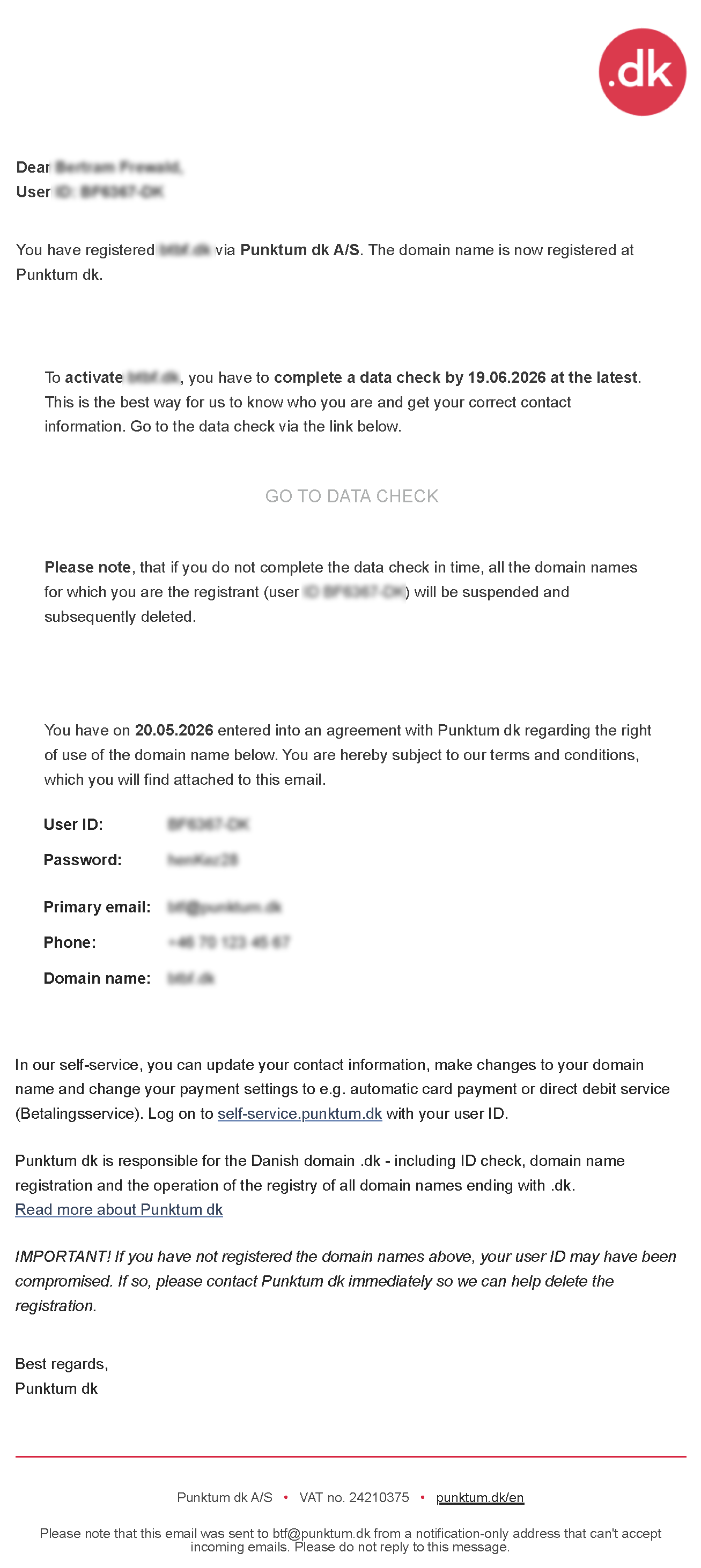
- The registrant receives an email from Punktum dk with a confirmation link.
- The registrant clicks the link to validate the email address.
- Once the link has been clicked, the data verification is complete.
Punktum dk only verifies that the registrant can receive emails at the address provided.
If the registrant is required to complete both data and ID verification, the registrant only receives a link to ID verification. The data verification is automatically marked as complete when the registrant clicks the ID verification link.
How you can view validation status
Via the registrar portal
- Search for the customer’s user ID in the WHOIS search in the registrar portal.
- The registrant’s contact information and verification status are displayed here.
- You can see whether the registrant’s email address and/or ID has been verified, for example whether the status is listed as “Verified by registry”.
Via EPP
Validation status can also be accessed via the EPP interface using an info contact command or through poll messages. The status appears in the dkhm:contact_verification extension and can, among other things, show whether the email address or ID has been validated, or whether verification is in progress, rejected, or expired.
See the EPP specification for dkhm:contact_verification: github.com/Punktum-dk/epp-service-specification
If the verification is not completed
If the registrant does not complete the ID verification before the deadline, the registrant’s domain name(s) will be suspended for 30 days. During the suspension period, the domain name can still be reactivated if the registrant completes the ID verification. If the verification is not completed during the suspension period, the domain name registration will be cancelled.
The deadline depends on the type of ID verification: registrants with a Danish country code have 30 days to complete ID verification via MitID, while registrants with a foreign country code have 25 days to complete ID verification by submitting documents, if ID verification is required.
If Punktum dk rejects an ID verification for a registrant with a foreign country code, the domain name(s) will be suspended immediately. The registrant still has the option to complete the ID verification afterwards.
If a registrant contacts you during this period, you can check the status, explain the next steps, and refer them to the email they received from Punktum dk.
Responsibility for updating contact information
If the registrant is managed by you as the registrar, you are responsible for updating the registrant’s contact information when necessary.
- For Danish registrants, Punktum dk automatically updates the name and address from the CPR/CVR register. The registrar must update the email address and/or phone number if the information changes.
- For foreign registrants, the registrar must update the address, email address, and/or phone number if the information changes.
- The registrar cannot update the name of an existing foreign contact but can transfer the domain name to a new registrant if necessary.
Examples of emails to registrants
Here you can find examples of the emails Punktum dk sends to registrants about data and ID verification. The examples can be used to understand the process experienced by the registrant.
Data and ID Check/Data Check